
MyHealthONE
HCA Healthcare IncMedical
3.91.18K Reviews
- Version
- 2.0.3
- Installs
- 500.00K
- Age Rating
- Everyone
Screenshots
Our Review of MyHealthONE
 Analysis by Appyee
MyHealthONE is the kind of medical app that can feel modest during the first few minutes and more useful after it becomes part of your routine. It is a patient health portal from HCA Healthcare Inc, designed for people who want a more convenient way to stay connected with their care. I found its value less in novelty and more in reducing the small bits of friction that surround appointments, health information, and ongoing contact with a healthcare provider.
That distinction matters. This is not an app I would open for entertainment or casual browsing, and it is not a substitute for urgent medical help. Its purpose is practical: give patients a digital doorway into their healthcare relationship. The app is free, rated for Everyone, and sits in the medical category, so it is aimed at a broad audience rather than a narrow specialist group. After using it, my main question was not whether it looked impressive, but whether it deserved a permanent place on my phone once the initial curiosity disappeared.
What MyHealthONE feels like during the first week
The first-week appeal comes from having health-related tasks gathered in one recognizable place instead of relying on scattered phone calls, paper reminders, and separate notes. For someone managing regular appointments or keeping track of an ongoing relationship with a healthcare organization, that central access can be reassuring. I especially appreciated the idea of checking the portal when I had a question about a recent interaction rather than trying to remember which office, message, or document contained the answer.
There is also a psychological benefit to a dedicated patient portal. Health information is easy to postpone when it is mixed with ordinary email and general productivity apps. A medical app creates a clear boundary: when I open it, I am dealing with healthcare rather than another everyday notification. That separation may sound minor, but it can make routine follow-up feel more deliberate.
The app was released on March 25, 2020, and its current version is 1.9.12. Those details suggest a product that has had time to mature rather than a brand-new experiment. In practice, I would still approach the first setup patiently. Medical portals are rarely the sort of apps where rushing through account details pays off. It is worth checking that personal information is accurate and making sure the account connects to the correct patient profile before relying on it for future appointments or messages.
One useful first-week habit is to open the app immediately after arranging care, not only on the day of the appointment. That gives me a chance to confirm that the visit is represented correctly and to notice any follow-up task while the conversation is still fresh. I also like keeping a short list of questions outside the app before an appointment, then using the portal afterward to organize what still needs clarification. The app becomes more valuable when it supports a workflow rather than acting as a passive place to look occasionally.
MyHealthONE has attracted over 500 thousand installs, with an average rating of 4.0 from around 8.3 thousand ratings. I read that as a sign of practical usefulness with some room for individual differences. A patient portal can work very well for one person and feel less essential to another, depending on how often they receive care and how closely their local healthcare experience fits the app.
Who gets the quickest benefit
I would recommend trying it first to people who have recurring appointments, several members of a household involved in care, or a tendency to lose track of medical paperwork. It can also suit someone who prefers reviewing information quietly on a phone instead of making a call for every routine question. Caregivers may find a portal helpful as part of their own organization, although they should pay close attention to whose account they are using and avoid treating access casually.
The strongest early use case is not a dramatic medical event. Imagine leaving an appointment with three ordinary concerns: remembering what was discussed, checking what happens next, and knowing where to look if a follow-up is needed. Rather than writing everything on a receipt or relying on memory, I would use the app as the digital checkpoint after the visit. That is the kind of small improvement that can make a patient feel more in control without adding another complicated system.
On the other hand, I would not install it expecting an instant answer to an urgent health problem. A patient portal is not the right channel for emergencies, and even for non-urgent matters, a message may not receive an immediate response. Anyone who needs rapid clinical attention should use the appropriate emergency or direct-care option instead of waiting for an app workflow.
Why the value either grows or fades after the first month
The first month is when MyHealthONE has to prove that it is more than a convenient setup exercise. In my experience with health portals, lasting value comes from repeated, low-effort moments: checking an upcoming care detail, reviewing what happened after a visit, or returning to information when a question comes up days later. If the app helps with those moments consistently, it earns space. If I only open it once and forget why it is installed, the novelty has not translated into a habit.
The best recurring workflow is to pair the app with real healthcare events. I would check it after booking care, again after the appointment, and later when preparing for the next conversation. This is more sustainable than opening it randomly. Medical information is usually meaningful in context, so a calendar reminder or a personal routine can be more effective than expecting the app itself to create a habit.
Another non-obvious advantage is that a portal can reduce the mental cost of preparing for a visit. Before an appointment, I can gather questions based on what I previously discussed, note changes in symptoms in my own words, and use the available patient information as a prompt for what to ask. The app does not replace my own notes, but it can give those notes a reliable starting point. That is particularly helpful when a person feels nervous and tends to forget details once the consultation begins.
I would also treat the app as an archive for continuity, not merely a same-day tool. When care stretches across multiple visits, the ability to return to the same digital channel can make the process feel less fragmented. The benefit is strongest for patients who otherwise keep screenshots, paper slips, and separate reminders in different places. The trade-off is that an archive is only useful if I can find and understand what I need when I return to it.
This is where MyHealthONE compares favorably with the usual alternatives, but only in a specific way. Phone calls can be better when a situation is complicated or needs a human explanation. Paper documents can be easier to annotate and keep physically available. A general calendar is better for personal reminders because I control it directly. The portal sits between those options: it is more focused than a calendar and more convenient for routine digital access than paper, but it cannot replace a conversation when interpretation or urgency matters.
When another option is better
If I rarely interact with the healthcare system and have no ongoing appointments, the app may not provide enough recurring value to justify regular attention. Someone who already has a dependable personal system for records and reminders may also notice only a small improvement. In that situation, I would still consider keeping it installed for future access, but I would not force myself to use it daily.
It is also not the best choice for people who want a broad, all-in-one wellness dashboard. MyHealthONE is a patient portal, not a replacement for a fitness tracker, medication organizer, symptom journal, or general health education library. Those tools may be useful alongside it, but expecting one app to perform all of those jobs would create unnecessary disappointment.
For families, the important question is not simply whether everyone can use the same phone. The important question is whether the right person is viewing the right health information. I would keep accounts and profiles carefully separated, especially when more than one person receives care through the same household device. That small discipline prevents the portal from becoming confusing at exactly the moment accurate information matters most.
The maintenance burden is small, but not invisible
MyHealthONE does not need the kind of daily maintenance associated with a social network or a fitness app. I would not expect to spend time customizing it for entertainment or feeding it constant data. Its maintenance burden is mostly behavioral: remember that the portal exists, keep account details current, and return to it when care creates a reason.
That low frequency is both a strength and a weakness. Because I do not need to open it every day, it is easy to forget the sign-in process or overlook a useful update. I recommend opening it before a planned appointment rather than waiting until the last minute. That gives enough time to deal with an old login, unfamiliar screen, or missing piece of information without turning the appointment morning into a troubleshooting session.
A second practical tip is to avoid using the app as the only reminder system. I would put important appointment times into a calendar as well, because a patient portal and a personal reminder serve different purposes. The portal is the place I consult for healthcare context; the calendar is the place that actively prompts me. Combining them creates a more dependable routine than relying on memory or assuming every important event will be noticed at the right time.
I would also review notifications with restraint. Medical alerts can be useful, but too many ordinary phone notifications can make me dismiss everything automatically. The goal is not to make the app constantly visible. The goal is to notice the information that affects a real healthcare task. If notifications become background noise, I would adjust the phone settings while preserving another way to check the portal manually.
Privacy deserves ordinary, practical attention rather than panic. I would use a screen lock on the phone, avoid leaving the account open on a shared device, and sign out when other people may use the phone. These habits are especially important for a medical app because convenience should not mean casual access to personal health information. The app’s Everyone age rating describes who may use it, not a reason to ignore basic account care.
Where fatigue can appear over time
The first source of fatigue is the gap between what I want to know and what a portal can reasonably show or explain. Medical information often needs context. A short entry or message may be useful as a reference but still leave me with questions. If I repeatedly open the app hoping it will interpret a situation for me, the experience becomes frustrating. I get better results when I use it to prepare a clear question for a clinician rather than expecting it to make the clinical judgment.
The second source is inconsistent personal relevance. A patient with active, ongoing care may return often, while a healthy person with one occasional visit may not. That means the app’s long-term value is seasonal and personal. I would not measure it by daily engagement. I would measure it by whether it saves effort during the moments when healthcare becomes administratively complicated.
There is also a risk of duplicate organization. If I maintain a paper folder, a notes app, a calendar, and the portal without deciding what each one is for, I can create more confusion than before. My preferred division is simple: the portal for patient-care information and communication, the calendar for timing, and personal notes for questions and observations. That arrangement makes the app easier to maintain because it is not being asked to do every job.
Another trade-off is emotional. Opening a healthcare app can remind me of appointments, tests, or unresolved concerns that I would rather put off. That is not a flaw unique to MyHealthONE, but it affects whether the app becomes a comfortable habit. I found that using it at a planned time, instead of checking repeatedly when anxious, keeps it useful without allowing it to dominate my attention.
The app has around 1.1 thousand written reviews, and the overall four-point average suggests a generally positive but not universal experience. I would interpret that carefully. Ratings can reflect account setup, local care workflows, device behavior, and personal expectations as much as the app interface itself. A patient deciding whether to try it should focus on the practical question: will a central portal reduce the effort involved in their own care?
My long-term verdict on keeping it installed
After the novelty fades, MyHealthONE earns lasting space for me when I treat it as an occasional healthcare utility rather than a daily lifestyle product. Its recurring value comes from being available when I need a patient portal, especially around appointments and follow-up. That may sound less exciting than a constantly active app, but it is exactly the right standard for medical software. The best result is often a quieter, more organized experience.
I would keep it installed if I had continuing care, regular appointments, or a clear reason to return to a centralized patient account. I would also recommend it to someone who feels that phone calls and paper records create avoidable friction. The free price removes the financial barrier to trying it, while the broad Everyone rating makes it approachable for ordinary household use. Still, I would judge it by whether it fits my healthcare routine, not by the fact that installation is easy.
I would skip it, or use it only occasionally, if I wanted urgent medical advice, a full wellness tracker, or a replacement for direct communication with a clinician. It is also not the right answer for someone who dislikes digital records entirely or who already has a simpler system that works reliably. In those cases, adding another portal may create maintenance rather than remove it.
My final impression is favorable because the app’s strength is practical and durable. It does not need to entertain me or persuade me to return every day. It needs to be dependable enough that, when a healthcare task appears, I know where to start. The lasting benefit is reduced friction, not constant engagement. For patients whose care fits that model, MyHealthONE is a sensible medical app to try and keep available, provided they use it alongside—not instead of—appropriate professional and emergency care.
Developed by HCA Healthcare Inc, it has reached more than 500 thousand installs and remains free to use. Those figures make it easy to understand why it has become a familiar option for many patients, but my recommendation is still personal: install MyHealthONE when you have a real healthcare workflow to support, set it up carefully, and give it a month of purposeful use. If it helps you prepare, follow up, and find your patient information with less effort, it has earned its place. If it merely duplicates tools you already manage well, there is no need to turn it into another obligation.
Privacy and Permissions
See what permissions an app requests and how it handles your data.
- Camera
- take pictures and videos
- Other
- view network connections, full network access, control Near Field Communication, run at startup, prevent device from sleeping, Google Play license check
Verdict
Strengths of MyHealthONE
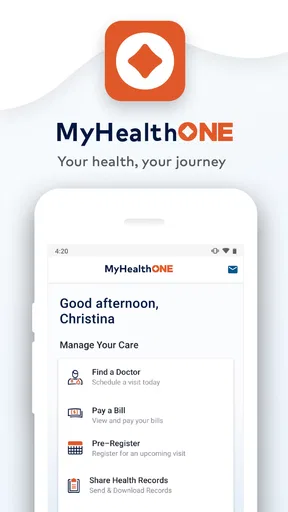
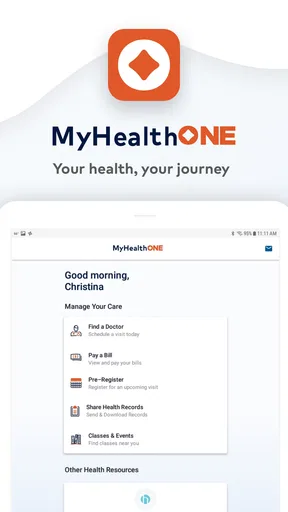
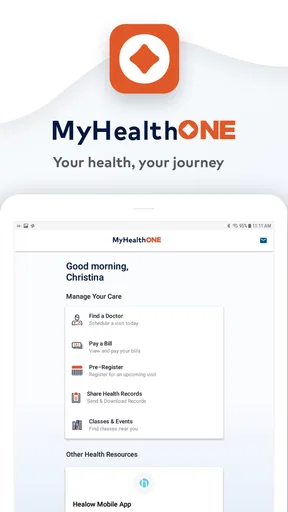
- Centralizes appointments, test results, bills, and medical records in one app.
- Makes it easy to find affiliated hospitals, doctors, and urgent care locations.
- Appointment requests can save time compared with calling the provider’s office.
- Secure messaging helps users communicate with participating care teams.
- Useful hospital tools may include directions, parking details, and facility information.
Limitations of MyHealthONE
- Features and records vary depending on the participating hospital or provider.
- Some appointments may require confirmation by phone after submitting a request.
- Bill payment options and insurance details can differ between facilities.
- The app is less useful if your doctors do not use the MyHealthONE network.
- Users may need separate logins or extra verification for certain services.
Similar Picks in This Category
View All
WebMD: Symptom Checker
WebMD, LLC4.1

Microphone Amplifier
DOSA Apps4.2

Anatomy Learning - 3D Anatomy
3D Medical OU4.5

Period Tracker and Calendar
SimpleInnovation4.9

GoodRx: Prescription Coupons
GoodRx4.8

CVS Health
CVS Pharmacy4.5
Frequently Asked Questions
What is MyHealthONE, and what can I use it for?
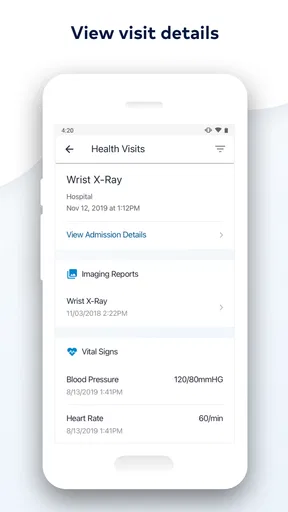
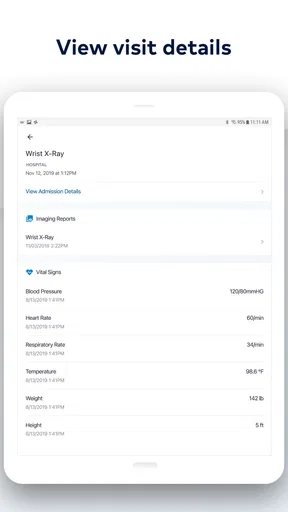
MyHealthONE is a patient portal app designed for people receiving care at participating HCA Healthcare facilities. After signing in, users may be able to view parts of their medical records, review test results, manage appointments, access visit information, and communicate with their care team. Available features can vary depending on the hospital, clinic, account setup, and the type of care received.
How do I create a MyHealthONE account or sign in?
To use MyHealthONE, you generally need to register through a participating HCA Healthcare facility or use the enrollment details provided after a visit. The app may ask for identifying information, an activation code, or an existing portal login. If you cannot remember your credentials, use the recovery options in the app. For registration problems, contact the facility where you received care.
Can I view my medical records, test results, and medications in MyHealthONE?
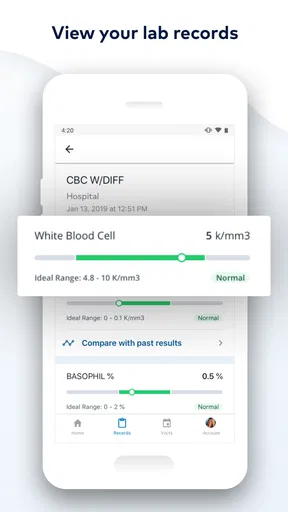
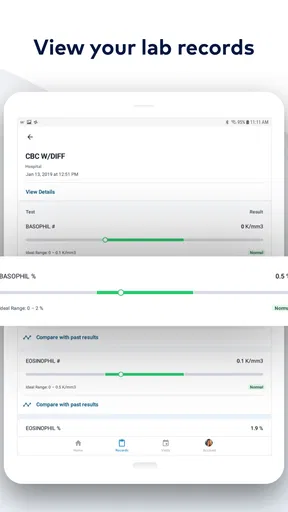
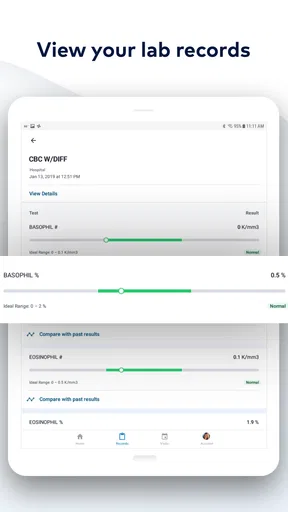
MyHealthONE may provide access to selected health information, including medical records, laboratory or imaging results, discharge details, medications, and clinical documents. However, information is not always posted immediately, and some results may require review by a healthcare professional before appearing. The amount of information available depends on the participating facility and your specific patient account.
Can I schedule appointments or communicate with my doctor through the app?
Depending on the facility and the services it supports, MyHealthONE may allow you to request or manage appointments, receive reminders, and send secure messages to a care team. These options are not guaranteed for every provider or department. The app should not be used for emergencies or urgent symptoms; call emergency services or contact a healthcare professional immediately when prompt care is needed.
Is MyHealthONE free, and how secure is my personal health information?
MyHealthONE is generally available to patients without a separate app purchase, although normal mobile data or internet charges may apply. The service uses account authentication and security measures intended to protect personal health information, but users should still keep the app updated, use a strong private password, enable device security, and avoid signing in on shared or public devices. Review the current privacy policy for details.
